Showing posts with label Tech-Buzz. Show all posts

Top 5 places to find Royalty free images


Royalty free Images - TechieOasis

Why is the social media site Pinterest is becoming so much popular? What we can learn from the popularity of the Pinterest is this: people love to look at relevant, attractive images online. These are few of the benefits of adding image to you blog or website :
-         Professional & attractive appearance
-         Good amount of engagement
-         Some SEO benefits using ALT attribute and carefully named your image file.
-         Potential for additional traffic through Google Image, Pinterest and much more…..
After all this, you may ask where to find royalty free images or images which will be under the budget than you can freely use on you web properties?
Today, we see some of the sites to which lend the solution to find royalty free images. We will look at the little description of each this to help you find the perfect royalty free images for your blog or site, while staying legal and safe in the process
Note: Google Images looks easy place to start for finding the royalty free images but be cautious those images may or may not be free to use in blog or website.


List of Sites to find the Royalty Free Images


Creative Commons Search


creative common search

Number of images are made available on web under the Creative Commons license.
There are different versions of licenses exist, which solely depend on the image owner. Generally, you are free to use their images on your blog as long as you credit their owners.
Creative Commons is powerful tool which helps you to track “free to use” stock photos from the giant sites like Flickr.
Using Creative Commons Search you can find large number royalty free images within no time.

Morgue File

Morgue File

Morgue File is a directory of images submitted by various photographers and illustrators to help other to by using there visual projects, this make one of the safest place to find royalty free images.  Morgue files can only be used after some alteration, so there are only two ways to use these files
First, you can some editing tools like PicMonkey, to edit the image and after it you can use that image. Second, you can directly use these images but you must inform the owner of the usage and provide the link for them.
From their website:
“ You are free to:
Remix – to adapt the work.
Commercial – to use this work for commercial purposes.
Without Attribution – to use without attributing the original author.
Under the following conditions:
Stand- alone basis – You cannot sell, license, sublicense, rent, transfer or distribute this image exactly as it is without the alteration.
Ownership – You may not claim ownership of this image in its original state.”

 Before going further look on these:

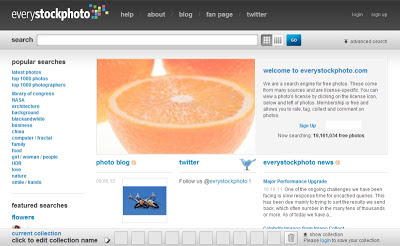
Every Stock Photo acts as a search engine which help to various royalty free images i.e. free to use. On upside of it, this is one of the best place to find specific kind of image, if have idea in mind. On the downside, each and every image has its own licence, which means you have dig little deeper when you find the image and you’d like to use and ensure that your proposed usage is permissible and ofcourse it should be legal.

Stock.XCHNG

Stock XCHNG

Stock.XCHNG is arguably one of the best-known sources of free stock images for use by the website owners and the bloggers. Around 4 million royalty free images available on the site.
Overall usage policies at the SXC are fair for end users like you and me – generally you can use these images on your website but you need go through the license of each image before use.
From their website:
You may use the Image
In digital format on websites, multimedia presentations, broadcast film and video, cell phones.
In printed promotional materials, magazines, newspapers, books, brochures, flyers, CD/DVD covers, etc.
Along with your corporate identity on business cards, letterhead, etc.
To decorate your home, your office or any public place.
You may not use the Image
For pornographic, unlawful or other immoral purposes, for spreading hate or discrimination, or to defame or victimise other people, societies, cultures.
To endorse products and services if it depicts a person.
In a way that can give a bad name to SXC or the person(s) depicted on the Image.
As part of a trademark, service mark or logo.

Stock Vault

Stock Vault

It house over 39K images which can be freely downloaded and also can be used freely.
The use of images on personal websites is acceptable though the image cannot used on the commercial websites. visit the site
From their website:
Can I use the images on my personal blog that has ads? Yes
Can I use the images on my company website? No
Can I use the images on my company blog? Only if you are not using them to promote your services.
Can I use the images for educational purposes? Yes
Can I use the images for charity projects? Yes
Can I use the images in a tutorial I’m writing? Yes, if you provide a link back to the image page.
Can I use the images to create image packs and give away on my own site? No
Can I use the images in a demo I’m creating? Yes
Can I use the images in paid smartphone apps? No
Can I use the images in free smartphone apps? Yes

How many of these are used by you to find Royalty free images? Which service do you use to find royalty free image? Do you have any suggestion on how to find Royalty free images ?
Tell us by commenting below.

LIKE & SHARE & COMMENT this article because you know this give us motivation to bring more & more information to you & make you abreast with the going trend of the Industry!!


5 Tools to create a mobile app for blogger’s blog


Hello you, after a successful creation of blog on web i.e. TechieOasis, one thing was clear that is, we now have to move on to smart world consisting of smartphones, tablets, iphone, ipad, etc., because in this modern era people don’t want to “Switch On” their PC for everything, they say, “Why to use PC when we have smartphones in hand? ”, Analysis also shows that Smart world consist of more no. of mobile, ipad, iphone, tablet, etc., users than PC or notebook users.
Hence to increase our audience we need grab this smart world. But, question is how?
One of the best ways is to Create a mobile app for your blogger’s blog? For this you need some important tools.

List of Tools to create a mobile app for your blogger’s blog


Appsgeyser


Appsgeyser has some very useful feature like it converts all of your content into an apps & also allows you to make money from your created apps. It provides lots of features like social sharing, messaging, with full support of the HTML 5. On and on helps you to create a mobile app with some cool features.

Andromo


Andromo is an android apps maker & requires no prior knowledge of coding to create a mobile app. Apps made by Andromo are faster, easy to use, efficient and decent.


Apps-Builder


Apps Builder is again a good website to create a mobile app for blogger’s blog. It has some important features like:- 
Cloud Publishing Platform
Cross Platform Panel
100% Customizable
Web Marketing Toolkit

Uppsite


Uppsite is also a tremendous website to create a mobile app for all mobile plateforms, which means better reach, better engagement and lots of other benefits.

Joemobi


Joemobi has some of the very best Mobile apps already in the market. Good one to create a mobile app. On the downside Joemobi cost you some money to download and share your app.


Tell us which tool you are using to create a mobile app, by commenting in comment box. Also if you have any other tool in mind than let us and our reader know by commenting in the comment box.
LIKE & SHARE & COMMENT this article because you know this give us motivation to bring more & more information to you & make you abreast with the going trend of the Industry!!

Top 4 Free Video Editing App


In todays, Modern Era we all have mobiles, smart phones, tablets etc., and I believe most of us will using mobile for most of the work which can possibly be done by mobile, ex – taking notes, surfing the net, even photo-editing etc. We all want to do things as much as possible through our mobile and tablets, without switching our desktop.
One day, keeping above feeling in mind, I got one funny video which needs little editing and I thought, why should I open my desktop to edit this video. Then I searched for free video editing app for android phone and tablet and I am here share with you the information.

List of Free Video Editing App


Free Video Editing app for Android 1. Clesh Video Editor


Clesh


Clesh Video Editor is a quite an advanced Android video editor because it edits your videos in cloud. It will be very convenient to pick up where you left off on a desktop computer & vice versa. Unlike other Android video editing apps, Clesh is not only limited in the video trimming. Some of its great features include filters, panning, transitions & zooming, etc.

Free Video Editing app for Android 2. VidTrim

VidTrim

The free VidTrim provides us  with some limited editing functions but it is quite enough to meet basic editing needs. For example, with  the VidTrim, we also can trim our  video clips & apply cool video effects like Negate or  SwapUV, etc. However, it still supports conversion of video files to MP3 audio files & transcoding into MP4 files with customized size.


Related Articles:


Free Video Editing app for Android 3. Magisto

Magista

For making some memorable and beautiful videos with some music & effects, check out Magisto. When you shoot the videos with your Android device, you can upload it to Magisto, choose a soundtrack of your choice  and a title,  and this app will automatically edit your video for you. It intelligently stiches video and clip together, it also provide facility to add some fancy transition effect and audio track of your own. It is very easy to use application.

Free Video Editing app for Android 4. AndroVid

AndroVid

AndroVid is another professional free video editing app is designed to use and the user to edit video & make movie with several simple clicks. It supports MP3, MOV, MP4, WAV, PNG and JPG file formats, which means we can edit more types media files with this app. It also allow us to export movies in 720P, 480P, and 320P.


Tell us which of these free video editing apps you use? Or Tell us, which free video editing app you use to edit your video? By commenting in our comment box


Networking - As a Giant Career

Plugin your career into right jack!
Hello everyone this post concern about the Networking enthusiastic who want to make career in this field & have great passion & determination to face the upcoming challenges of professional life!
Pointless to mention that you have chosen one of the prestigious & highly paid stream!
I'll start from grass root level & shall guide you in all the possible direction.
So lets start off......Ladies & Gentleman the basic thing you need to start a career in IT industry is passion to learn & find solutions when in tight corners be it software testing, blogging, software designing, networking, DBA or any other field if you own these skills than nobody can stop you & wherever you go you'll come out with flying colors.

This industry demands for a particular mindset which is acquired by some & liked by everyone...see I am not stopping you to try for this great IT field but the thing is if you have different qualities than what are required than it'll be mere waste of time & efforts..no matter how hard you try you'll never be honored by success.....I personally know few of my college who were too philosophical to be a CS engineer so they suffered at every single step....they realized it very soon & switched over their job as a Column writer & believe me they are damn happy now & living a life full of satisfaction & honor....& i know such persons too who have rises tremendously in their networking career & this profession have given them so much that words cant express...
So the point behind this long lecture was to make you realize the demands of this field with great details...
So by now i assume you have these qualities because you have decided to read further....wait wait one more possibility is there that or you may be confused about you qualities....so if this is the case then i would suggest you to take pain & develop a program that you have never thought of...had no idea before (ask for such a prog. From your teacher, because he know better about your capabilities) try out sincerely to solve it...sincerely means SINCERELY no code copying no idea coping....just create you own one yes you can google but again i am saying don't see code for it...read books & take your time...by the end of the week or so(dependent on the level of ques given) you'll realize your potential & you can very well judge that this is you field or not!
Problems solved....work finished!
By now i am cent per cent sure you are ready to work with one of the finest industry!!
So lets get started with the real topic Networking

See we all know about networking but there were no parameters to test the knowledge of a worker & this decision was subjective & opinions were different for different individuals....so CISCO (the networking equipment giant) came up with the solution & started it's certification courses... These are valid worldwide & adds starts to your CV.

First level is Entry Level CCENT (CISCO CERTIFIED ENTRY NETWORKING TECHNICIAN)
This is the preliminary exam for networking which assures that your basics are right & you can go on to the next level. This is the first step towards CCNA.

Second Level is Associate Level CCNA(CISCO CERTIFIED NETWORK ASSOCIATE)
This is one of the demanding certification of networking  & the CCNA certified person is always preferred among the rest!
As the name suggest Associate it is the just a step higher then freshers..
You can get CCNA certified in any of the available 7 branches

CCNA Routing & Switching
CCNA Security
CCNA Service Provider
CCNA Service Provider Operation
CCNA Video
CCNA voice

The beauty of this Associate level certification is that if you are confident enough that your basic are right in networking then you can directly apply for itwithout appearing in CCENT....i.e it have no prerequisite!


Third Level is Professional Level CCNP (CISCO CERTIFIED NETWORK PROFESSIONAL)
This is a professional level certification in networking & pointless to say how much it is valued...one of the toughest & most challenging...
CCNP certified person have proved himself best for the complex networking technology & he is eligible to work as a network technician, support engineer, systems engineer or network engineer.
Worthy to mention that once you have decided your field during CCNA certification than you will be entitled to follow the same for CCNP & CCIE.

Fourth & final stage is CCIE(CISCO CERTIFIED INTERNETWORK EXPERT)
This is the highest level of networking  certification the individual can have in the chosen field...once you have attained this than there are no question about your ability & endurance to work!
This is one of the toughest course & selection rate is very low...only Grey Matter can make through it!
And let me tell you CCIE are the highest paid employee in the World! I'll come to this point in the upcoming lines!

Now we have discussed about the networking certification....lets talk about the job opportunities & Pay scale.

Job designations & pay for CCIE Certified Employee are

Network Engineer (INR 1,12,000 – 8,10,500)
Sr. Network Engineer (INR 2,27,200 – 18,21,700)
Network Administrator(IT) (INR 1,99,600 – 11,12,850)
Network Security Engineer (INR 2,32,699 – 21,63,900 )
Security Consultant (INR 2,93,614 – 15,35, 900)

You can see these are some of the highest paid employee & as i said earlier this job is for those individuals who love challenges & have something down their head...called Grey Matter!

So have fun wish you very Luck for you career & what else just party hard when you get achieve you goal!!

Have a great day!

Yes I would like to hear from you about this small 'Sit Down & listen ' kind of post!
Do reply & ask for any suggestion or query my comment box is 24x7 active for you!
bbye 
have a great day!


Enhanced by Zemanta