Preview of Samsung Galaxy S IV and rumors


Samasung Galaxy S IV

Waiting for the Samsung’s flagship smartphone of 2013!!! Here it is “Samsung Galaxy S IV” with all the features which you would love to have in your phone. As in rumors Samsung Galaxy S IV is expected to have a brand new flexible display. This time Samsung’s new launch is said to give a head on competition to Apple iPhone market. It is supposed to have better looks and slightly lighter weight body to attract the customers. And according to the rumors it is supposed to be equally or even more popular than the Samsung S III. Samsung’s this smartphone is expected to be launched in mid-end of April or in starting of May.

Something about Samsung mobiles


Samsung was found in 1938 by Lee Byung-chull now head quartered at Samsung Town, Seoul. It was actually established as a trading company, and then the next three decades it expanded itself into food processing, textiles, insurance, security etc. It entered the market of electronics in late 1960’s. Over last two years Samsung has made a remarkable progress in field of cell phones and has gained reliability and trust for itself by its good and quality products with virtuous policies.

Features of Samsung Galaxy S IV (Rumored)


This phone has already received great amount of hype regarding its art specification. Samsung Galaxy S IV is expected to have Super AMOLED screen with 1080p display and pixel density of 441 ppi, far better than the industry’s best specification. The display is made of new range of flexible glass which will make screen more craggy and flexible. Its camera clarity is even more than blackberry’s to be launched mobile Blackberry Z10 and BlackberryQ10. Its price is estimated to be in the range of Rs.40, 000 and is supposed to be launched soon.

Specifications


  •     Display:

             Size: 5.0 inches
             Type: Super AMOLED capacitive touch (16 M colors)
             Multi touch: Enabled
             Resolution: 1080×1920 pixels

  •      Technology:

             OS: Android OS-Jelly bean
             Version: v 4.2
             Java: yes (MIDP 2.1)

  •     Processor:

             Quad core processor
             2 GHz cortex A-15

  •      Memory:

             Internal memory
                   2 GB RAM
                   16 GB Storage
            Expandable memory
                   Micro SD, up to 64GB

  •     Data and carrier networks:

            2G (GSM 850 / 900 / 1800 / 1900)
            3G (HSDPA 850/900/1900/2100)
            4G LTE
            Wi-Fi enabled

  •     Body and sound:

            Weight: N/A
            Dimensions: N/A

  •     Camera:

            Primary:  13 MP, auto-focus and LED flash (enabled)
            Secondary:  Yes

  •     Other Features (Enabled):

            Bluetooth 4.0
            Video recording
            GPS: A-GPS support, GLONASS (enabled)

  •     Battery:

               Li-Ion (1800 mAh)
            Stand-by Talk time: N/A

Conclusion for preview of Samsung Galaxy S IV


It is a worth wait mobile with many exiting features and an excellent camera quality. As we all know has proved itself by the launch of Samsung GalaxyS II which even trodden iPhone, so there are no second thoughts how Samsung Galaxy S IV is going to be. Anyways, Samsung never failed to surprise us over the past couple of years when it came to its high-end terminals, and we are sure that the Samsung Galaxy S IV will make no exception. So keep waiting and keep your fingers crossed!!
If you are searching for cheap android smartphone then have a look of Intex AquaWonder.

If You Found This Article Worthy, Then Like And Share It. Thanks!


For More Updates, be connected with us. Feel free to comment here for queries.


Back To: HOME


Some file sharing techniques


File sharing is an important part of living in the digital world. If you are using any type of digital or electronic media, then you may have already suffered this problem and may have found some solutions also. In this article I will share some solutions which you may be old for few and definitely new for many, so go through this article to see what catch is here for you.
Among the several ways of File sharing few are explained below:

File Sharing without the internet connection:

This type of File sharing is done on the Network. At first, while reading you may think this is a lengthy procedure but believe me when you do it once or twice it will not take more than a minute to complete the procedure.

1. Go to Start and open Network and Sharing Center.
Start > Network and Sharing Center.
2.  Now select the ‘Change adapter.

file sharing using LAN configuration 1

3. Now Right click on the Local Area Connection then Properties. Now under the Networking tab, make sure that the File and Printer Sharing for Microsoft Networks is ticked.


file sharing using LAN configuration 2

4. Make sure that File and Printer Sharing is also ticked for Home/Work (Private) and Public. For this you will have to choose the option under the “Choose home group and sharing option” in the Network and Sharing Center.
5. Now select the file or folder for sharing. Right click on it and then select Share With. Now you have different options for File sharing. You can either choose Homegroup (Read) or Homegroup (Read/Write) or other depending on your preferred choice. I go with option, Specific people. Now, you have to choose people to whom you want to do the File sharing. After selecting click Add and then OK>Done.
You have almost completed the procedure of File sharing expect the last step i.e. Local Area Connection Configuration for your File sharing.

a> Right click on the Local Area Connection then Properties. Now under the Networking tab. Double click on the option Internet protocol version 4(IPv4)  and fill the blanks with IP and subnet mask shown in figure.

IP configuration


NOTE:
The IP address should be different and should fall in private range i.e. 192.168.0.1 - 192.168.255.254, 10.0.0.1 - 10.255.255.254,172.16.0.1 - 172.31.255.254. Subnet mask must be the same.

b> To check the connectivity say hello to other computer using ping command. For this open the command prompt and write ping (IP Address).

Check result of ping. A successful ping will have sent and receive value same. Everything is completed for File sharing but till now, we havn’t know where the shared file are there. For this open the My Computer, click on the Network option present in the left-pane and choose the name of the PC whom file you want to use and open it. You can see the files and folder which are shared by that computer.

 A computer-to-computer (ad hoc) network:

 Ad hoc is a kind network which is a temporary connection between computers to other devices in the network. If you want to do the File sharing or data sharing like sharing presentation, documents, or want to play multi-player computer games, then you can use this temporary connection for File sharing. For this you have to create an Ad hoc so that other user can join your Ad hoc network.
*Remember Ad hoc network uses only wifi, so before creating an Ad hoc network check whether proper wireless network adapter is installed on your computer or not.
Following are the steps for File sharing using Ad hoc in Windows 7
 1.    Open your Network and sharing center by clicking on the Start button, then type Network and sharing and open Networking and network and sharing center.
2. Click on the option ‘Set up a new connection or network’, a dialog box will open in front of you.


ad hoc setting image 1

3. Now scroll down the list and select ‘Set up a wireless ad hoc (computer-to-computer) network’, click on the Next button and follow the steps.
ad hoc setting image 2


The WEB:

Today, you can find lots of websites which are devoted for File sharing, document sharing, sharing photos, etc. The list of names can go on and on but for now I provide you with the list of some famous File sharing sites :
online file sharing

           1.    FilesTube
           2.    4Shared
           3.    MediaFire
           4.    RapidShare
           5.    Box.net
           6.    HotFile
           7.    zShare
           8.    Uploading
           9.    DepositeFiles
          10. ZippyShare


E‑mail

File sharing through email is common practice among the business because most of the files are very small. So, you can attach your small file with e-mail and sent to desired person.

Instant messaging

Nowadays, many Instant messaging site allow you to attach small with the message so you can also use these for small size File sharing.
  

Removable media

 As a geek you definitely have some sort removable media’s like pendrive, memory card, CDs, DVDs, portable hard disks, and flash memory cards. You can plug that media into the device, copy the files and folders and give it to the people to whom you want to the File sharing.


If You like this post then Share and Like this on social Site.

If You are having any query, then mail me or comment here!


 Keep Enjoying!!!


Back to : HOME

Review of Blackberry Q10


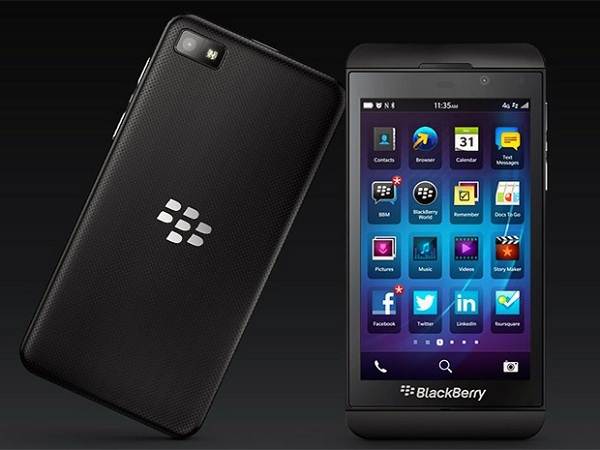
Blackberry Q10

Blackberry is going to launch another QWERTY keyboard mobile “Blackberry Q10” in market in late February or in first week of March. It has biggest battery and has largest keypad than any other blackberry phone till now. It has an outstanding built quality and the battery cover is made of “glass weave”. It has a powerful battery backup and new Blackberry 10 OS makes it even more special with straight key rows rather than curved.


Blackberry at a glance:


Blackberry is well known for its handheld wireless devices. The first blackberry product (email pager) was released in 1999. The UI (user interface) of blackberry mobiles depends on model, but mostly it has launched QWERTY keyboard mobiles. New launches of blackberry also include multi-touch screen and virtual keyboards. Blackberry holds 3% of whole mobile device sales in the world in 2011, and manufactures the sixth most popular device in world out of which 25% are smartphones. As of September 2012, 80 million subscribers worldwide were subscribed to BlackBerry. The latest smartphones to be launches are Blackberry Q10 and Blackberry Z10 which are released in UK and Canada. As expected, In India it will be launched in last week of February or in first week of March.


Exciting features of Blackberry Q10:


For the people who like QWERTY keyboards, Blackberry Q10 is blackberry’s good attempt to ease the transition. It has a QWERTY keyboard and touchscreen with and is a classy mobile with Blackberry’s new Blackberry 10 OS. It has the biggest battery and largest keyboard as compared with any other blackberry phone. It has straight key rows where buttons go up to the edges. Blackberry Q10 has quite outstanding: graphics with good resolution, 3.1-inch square display. Like Blackberry Z10, Blackberry Q10 also has HDMI output and 4G mobile internet connectivity.

Specifications:


  • Display:

             Size: 43.1 inches
             Type: touch (capacitive) , 16 M color
             Multi touch: Enabled
             Resolution: 760×760 pixels

  • Technology:

             OS: Blackberry 10
             Java: yes (MIDP 2.1)

  • Processor:

             Dual core processor
             1.5 GHz cortex A-9

  • Memory:

             Internal memory
                   2 GB RAM
                   16 GB Storage
            Expandable memory
                   Micro SD, up to 64GB

  • Data and carrier networks:

            2G (GSM 850 / 900 / 1800 / 1900),
            3G (HSDPA),))
            Wi-Fi enabled

  • Body and sound:

            Weight: 139gm
            Dimensions: (119.6 × 66.8 × 10.4 mm)

  • Camera:

            Primary:  8MP, 3264×2448 pixels, auto focus, LED flash
            Secondary:  Yes

  • Other Features (Enabled):

            Bluetooth
            Video recording

  • Battery:

                   Li-Ion (1800 mAh)
            Stand-by Talk time: Upto 10 hr

Conclusion of Blackberry Q10 Review:

    
Blackberry Q10 is a very good phone as far as battery back-up is concerned and has a very classic style. One will love to buy it as its battery back-up is very good and has Blackberry 10 OS. It has a differently designed keyboard which makes it even more attractive. It also has an expandable memory too. So it is good choice who likes to use QWERTY phones. Therefore it is an awesome choice for the people which are soon coming to your cities.
If you want cheap android smartphone you can go for Intex Aqua Wonder.


If You Found This Article Worthy, Then Like And Share It. Thanks!


For More Updates, be connected with us. Feel free to comment here for queries.

Back To: HOME

Up Coming Smartphone from Blackberry - Blackberry z10


Blackberry z10


Crazy about looks of iPhone 5! But can’t afford to spend 45,000 bucks on it? No problem blackberry is here for you, it’s “Blackberry z10” is coming soon which is very much similar to your iPhone 5. The first thing that will come to your mind at first glance of Blackberry z10 is iPhone 5. No doubt it can’t match the quality and clarity of iPhone 5 but watching from the front they look like lost siblings. But some features like front camera resolution, favorable micro HDMI port for quick video-out functionality, removable back-cover of Blackberry z10 are better than those of iPhone 5.


Release of Blackberry z10


Blackberry was known as the premier force in the smartphone world, before Apple relished its glory in 2007. Now again Blackberry is launching its two new swanky smartphones Blackberry z10 and Blackberry Q10 with new operating system. It is expected to be launched in India in late February or in first week of March 2013. It is also said that it‘s price will be in sub Rs.35, 000 price category. It is already launched and available in Canada and UK and is reporting an early success in both the countries. In Canada the initial sales have been in “thousands” whereas in UK it is “sold out”.


Specifications:


  • Display:

             Size: 4.2 inches
             Type: Capacitive touch with 16M colors
             Multi touch: Enabled
             Resolution: 768×1280 pixels

  • Technology:

             OS: Blackberry 10
             Java: Yes, MDIP 2.1

  • Processor:

             Dual core processor
             1.5 GHz speed

  • Memory:

             Internal memory
                   2 GB RAM
                   16 GB Storage
            Expandable memory
                   Micro SD, up to 32GB

  • Data and carrier networks:

            2G (GSM 850 / 900 / 1800 / 1900),
            3G (HSDPA),
            4G (LTE (market dependent))
            Wi-Fi enabled

  • Body and sound:

            Weight: 125gm
            Audio connector: 3.5m

  • Camera:

            Primary:  8MP, 3264×2448 pixels, auto flash, LED flash
            Secondary:  Yes, 2MP, 720p@30fps


  • Other Features (Enabled):

            Bluetooth
            Video recording

  • Sound:

                Loud speaker (enabled)
            3.5 mm jack (enabled)
            Alert Tone: vibration mode and MP3 ringtones

Iphone vs Blackberry z10


Conclusion for Blackberry z10:


This is an awesome phone for the people who want to have a phone similar to iPhone 5 but its quality, clarity and resolution is less as compared to iPhone. But it is good in some aspects as iPhone 5 has only 1.5 MP front cameras as compared with 2 MP of Blackberry z10 and the LED notification light is really appreciable. So one can have joy of having a mobile with looks very similar to iPhone can have a nice experience of its good features and enjoy their new phone. There are chances that this phone may beat the market of Intex aqua wonder.

If you found this article worthy, then like and share it. Thanks!


For More Updates, be connected with us. Feel free to comment here for queries.

Back To: HOME

Why to Choose Red Hat Enterprise Linux 6


Red Hat Enterprise 6


Hello everyone this post will really help you for seeking the right OS for your server. It is the one of the crucial thing to be taken care of. Because your total business depends on servers, if they are not enough secure and reliable, then you are gone. Setting up a server is the most crucial and mandatory task in an organization irrespective of the no. of employees you have! So in this post you are going to learn specialty of Red Hat Enterprise Linux 6.

Some points should be borne in mind before opting for a server OS!!


  • First of all zero downtime.
  • Full assistant
  • Vast repository
  • Secure
  • Support cloud computing
  • Highly customizable according to your requirement
  • Low at budget
  • Data integrity
  • Low power consumption


 All these parameters are very crucial for a server & nothing should be left out. I have tried hands on many server OS.  But finally got the RED HAT ENTERPRISE LINUX 6, which fulfill all the above stated parameters pretty well!

Let me introduce you with some of the fascinating feature of this master piece! RED HAT ENTERPRISE LINUX 6 is one stop solution for our entire server problem & will satisfy all the above stated parameters.


So some outstanding features of Red Hat Enterprise Linux 6 are:


  • As we all know LINUX use simple & light weighted programs thus they deliver fast processing speed & least downtime.

  • It have inbuilt servers which you need to install by simple commands & configure as required. It supports SAMBA, FTP, HTTP, DNS, PROXY and many more.

  • RED HAT ENTERPRISE LINUX 6 has a full technical assistant team which is available to all its certified users round the clock and trust me they are damn efficient.

  • Days are gone when we have to hunt for software for Linux now there are no fewer packages available for Linux then windows.

  • Linux is by far the most secure OS, since it does not support auto executable file (.exe) so there are hardly any chance of virus & yes it have one more unique property that it chain simple programs to perform complex task. Interestingly this OS doesn't support self-executable files even if the virus has intruded in the system it will not be executed as a result chain will never be broken.

  • In Linux all the configuration files are stored in the form of text so you can easily change them using vi editor. Please be careful while doing so it can corrupt your file & lead to system error too but don’t worry real administrators learn most from error msgs. then mere manuals.

  • For only $10 or so you can be the certified holder of RED HAT ENTERPRISE LINUX 6 and enjoy the full technical assistant round the clock & yes you get unlimited access to the repository too.

  • RED HAT ENTERPRISE LINUX 6 supports all the three category of cloud computing i.e. service as a software, application & hardware. By hardware as a service we mean you can migrate the OS from your server to client machine. Yes Gentlemen you can migrate OS to client system using RED HAT ENTERPRISE LINUX 6 & for that you must have high hardware specification.

  • Let me tell you the most amazing fact about RED HAT ENTERPRISE LINUX 6 that with an i 3 processor, 4 GB ram you can act as a full fledged server to 35+ machines running at single point of time.


I have been using RED HAT ENTERPRISE LINUX 6 since 3 years & I hardly encounter any problem & server you know runs 24*7. So what are you waiting for, go and try. I promise you will definitely love this OS. An alternate to this is Ubuntu.


If you find this Red Hat Enterprise Linux 6 article helpful then, Like and Share this.


Stay tune for more updates & feel free to comment here for any query.

Back To: HOME

Best Android Smartphone 2013 Reviews


            Intex Aqua Wonder
Are you searching for latest and Best Android Smartphone in market? Here comes your answer with the Best Android Smartphone in India which has boomed the market on its release itself. “Intex Aqua Wonder” the Best Android Smartphone having the latest android operating system. This has been chosen as the Best Android Smartphone as it is having the latest android OS (jelly bean) with latest features and has an affordable price too.

Intex in Market

Intex has been a pioneer in the market of electronic products and technology sector since last 10 years of its setup in 1996. It has boomed the market in last 7 years in broad fields of IT accessories, mobile phones and accessories, security software’s and consumer electronics. It has created a high reliability, creditability and dignity among the costumers and satisfying them by giving fine quality products at reasonable prices. Intex is ISO 9001:2008 certified and after-sales services are available online. Company is headquartered at New Delhi with 30 branches and more than 300 service centers all over India. Company has increased its turnover many folds in last 7 years and has jumped to a rank of 84 from 108.In Aug 2012 Intex had launched Intex Aqua 4.0, its first Best Android Smartphone in the market.

Intex Aqua Wonder is the Best Android Smartphone launched by Intex. Previously Intex had launched 7 more smartphones:

  • Intex aqua flash

        Price: Rs.9, 500/-

  • Intex aqua trendy

        Price: Rs.4, 900/-

  • Intex aqua marvel

          Price: Rs.4, 390/-

  • Intex Aqua 3.2

          Price: Rs.3, 690/-

  • Intex Aqua 4.0

        Price: Rs.5, 149/-

  • Intex Aqua S

        Price: Rs.4, 590/-

  • Intex Aqua 5.0

          Price: Rs.9, 449/-


 Specifications:

  •      Display:

             Size: 4.5 inches
             Type: Capacitive touchscreen
             Resolution: 960×540

  •      OS and Version:

             OS : Android
             Version : 4.1 (Jelly Bean)

  •     Processor:

             Dual core processor
             1GHz speed

  •      Memory:

             Internal memory
             512 MB RAM
             1.93GB
             Expandable memory
             Micro SD slot up to 32GB

  •      Data and carrier networks:

             2G, 3G, Wi-Fi enabled

  •      Body and sound:

             Weight: 125gm
             Audio connector: 3.5mm

  •      Battery:

            Type: Li-Ion
            Capacity: 18oo mAh
            Talk Time: 3.5 hrs
            Standby time: 72 hrs

  •     Camera:

            Sensor resolution: 8MP, 3264×2448 pixels
            Features: Dual flash
            Front facing camera: 1.3 MP

  •     Other Features (Enabled):

            Bluetooth
            Video recording
            Dual Sim
            GPRS

  •     Miscellaneous Features:

                Light Sensor
            Motion Sensor
            G Sensor
            Proximity Sensor

  •     Warranty:

               1 year for phone
            6 months for inbox accessories


  •    Conclusion for Best Android Smartphone:


 This mobile phone supports many 3 G, 8 MP camera, dual sim and lots more. Contrary to this it also has some cons. It could have supported more memory instead of 512 MB only. Also the internal memory of 1.93 could also have been exceeded to around 4 GB. This is Best Android Smartphone for the ones who want more trendy features rather than memory. For the ones who want more of memory support can go for HTC DESIRE C.

If you have any queries feel free to comment here. We will provide Solutions to your queries. Thanks!

Back To: TechieOasis

All Information and Applications of GPS TECHNOLOGY


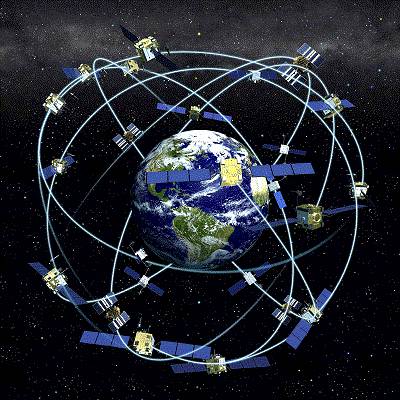
GPS technology model

GPS Technologyis a global positioning system, it is basically a space-based satellite navigation system which can provide with the accurate location, time and speed information in all-weather condition and independent of the day or night. GPS Technology works approximately anywhere on or nearby the Earth where there is clear and unobstructed line of sight to four or more special satellites, called GPS satellites. GPS Technology provides some critical capabilities to military, civil and commercial users present all over the world. 
It can be freely accessed by anyone with the GPS receiver. This project first started in United States, their aim was  to build a navigation system which can located anyone or anything precisely with the location and time, in the year 1973 there struggle meet with fate and GPS Technology was made to overcome the limitation of previous navigation systems.

Generally, GPS receiver are accurate within 15 meter range but newer versions which are in progress, have range less than 15 meters.

Basics of GPS technology

A GPS receiver’s work is to calculate its position by precisely timing the signal sent by GPS satellite present in space. Each of these satellites continually transmits the messages that include:

  • The time when the message was transmitted.
  • Satellite position at the time of message transmission

The received signal is used to find out the transmit time of each message and also the computation of distance of each satellite is done by the receiver using the speed of light. Now to find the location, speed, time and elevation receiver use the mathematical concept called trilateration i.e. each of the calculated distance & satellites’ location define a sphere. Now, the receiver is supposed to be on the surface of each of these virtual spheres when the satellites’ location and calculated distances are correct. These satellites’ location is used to calculate the location of the receiver using the navigation equation. Speed can be precisely computed using the position change. Now we have the location and speed which is displayed over screen.

Typically this whole GPS operation requires four or more satellite to compute the results because the fact that four or more than four spheres cannot intersect at the same, thus by solving the navigation equation to solve find the intersection, this computed solution will the give the quite accurate location with precise timings. Nowadays, this accuracy and precision is utilized by many GPS application to perform operations like traffic signal timing, time transfer, etc.

Few Limitations of GPS Technology

Cost

Google maps screenshot

GPS Technology system will definitely have price which is possible disadvantage of using GPS Technology

Reception

Working of GPS Technology for tracking purely depends on the reception of signals from the satellites. Hence places having tall buildings, dense forest, skyscrapers or canyon walls can block the GPS signal. GPS signal are not always good for penetrating the indoor spaces well, so there can be some spaces which will not allow accurate GPS navigation. 

Accuracy

To work precisely the GPS Technologyneed proper update of Maps this is not possible in real time. So there is possibility that your GPS device may lead you to some close road or may ignore the newly constructed path.

Battery

Most of the GPS device are operated on batteries, there is always a possibility of battery failure in that case external power is required which is not always possible.

List of Top GPS devices

GPS Device screenshot

 Garmin nüvi 2350LMT
 Garmin nüvi 3590LMT
 Garmin nüvi 3790T
 Magellan RoadMate 5045-LM
 TomTom GO 2405 TM
 TomTom GO 2535 M LIVE
 Magellan RoadMate 1700
 Magellan RoadMate 9055
 TomTom GO LIVE 1535M
 TomTom VIA 1535TM


Best GPS apps for Android


 Maps

Google Maps logo

In world of GPS Technology Google Maps is the first choice of user. It provide best user experience through its lovely features including the indoor maps, voice search, information about public transportation, and other interesting features.
Google Maps is whole new World of services which include Indoor Maps, Google Now, My Places, Google Places, Street View, etc.

Sygic GPS Navigation

Sygic GPS Navigator for Android is most suitable of automobiles. It provide with the voice navigation system which can be configured in several different languages. It provides with significant amount of function highlighting the landscape, 3D view and interactive maps. It also allows you to store map on your device which can be used in offline mode.

TomTom

TomTom is one of the most famous offline navigator and available for Android. Its main features include step by step instruction which can be changed in different languages, alternative routes to avoid traffic, provide fast & reliable maps that require no data connection.
With so many facilities this app comes in a price, and require large amount of space, around 2.3 GB, to install.

Waze GPS

Waze is a GPS application which provides the navigation and traffic information in real time. That’s not all it consists of a special social ingredient which is based on the users. Wazers are able to inform other the current state of traffic, street, or other incidents. This app has a good user friendly interface and is very simple to use.

Navitel Navigator

Navitel is best navigators that provide detailed maps of Finland, Russia, Ukraine, Belarus, Kazakhstan. This navigator is vastly known for its vast range of configuration option, among which include zoom, notices, routes, information and also the possibility to delete the interface data that you do not use.


If you have any queries related to the applications of GPS technology, you can ask it by commenting below..